What is RSD?
Overview
RSD (Drug Track and Trace System) is a national program run by the Saudi Food & Drug Authority (SFDA) that tracks pharmaceutical products across the entire supply chain — from the moment they're manufactured or imported into Saudi Arabia, through every stockholder (manufacturer, importer, distributor, warehouse, pharmacy, hospital), until they reach the patient. Every physical unit of a tracked drug carries a unique combination of GTIN (product code), batch, and serial number, and every stockholder reports their stock movements (receiving, transferring, selling, etc.) to the central RSD system.
The program supports Saudi Vision 2030 by:
- Monitoring the full supply chain so counterfeit, expired, or recalled medication can be identified and stopped in real time.
- Producing reliable statistics on which medications/sources are most targeted for counterfeiting.
- Letting patients check a medication's authenticity and safety via smartphone.
- Reducing the time needed to get reliable supply-chain data and cutting waste.
(Source: rsd.sfda.gov.sa)
RSD Operations
Every stock movement reported to RSD is classified as one of the following operations:
| # | Operation | Description |
|---|---|---|
| 1 | Accept | When receiving items from another stockholder, you must perform an accept operation. |
| 2 | Transfer | If you are a pharmacy and want to transfer stock to other stockholders. |
| 3 | Dispatch | If you are a warehouse/manufacturer and want to transfer stock to other stockholders. |
| 4 | Transfer Cancel | To cancel an already-done transfer operation, under the condition that the other stockholder did not accept the stock. |
| 5 | Dispatch Cancel | To cancel an already-done dispatch operation, under the condition that the other stockholder did not accept the stock, or if they performed a return operation. |
| 6 | Return | To return an already-accepted operation to the stockholder. |
| 7 | Import | For warehouses that register items received from external suppliers and want to add the serials to RSD. |
| 8 | Export | To export items outside the country. |
| 9 | Consume | For hospitals, when they dispense medicine to patients. |
| 10 | Supply | For manufacturers to add serials to the RSD system. |
| 11 | Deactivate | To deactivate expired and scrapped products. |
| 12 | Pharmacy Sale | For a pharmacy selling to a patient/customer. |
| 13 | Pharmacy Sale Cancel | If the customer cancelled the order, a pharmacy sale cancel is performed. |
Required Information
Every operation reported to RSD carries some combination of the following identifiers:
| Field | Description |
|---|---|
| GTIN | A unique number identifying a product. |
| Batch | A unique number identifying a manufactured set (lot) of products. |
| Serial | A unique number identifying a specific item. The combination of GTIN + serial must be unique for an item. |
| Expiry | The expiration date for the item. |
| Production | The production date for the item. Only required for the Import and Supply operations. |
| GLN | The Global Location Number of the other stockholder. Required when sending items to, or returning items from, another stockholder. |
RSD Response
Every operation submitted to RSD returns a response describing the result, including:
- notificationId — a unique number identifying the operation that was performed.
- response code — a code describing the result of the operation on the item(s). A code of
00000means the operation was successful; any other code indicates an error or warning. - Other information, including the products sent, the operation name, and so on.
The full response schema (including a real example) is documented in the API reference — see RSD Notifications.
Deserialization
At the end of June 2024, RSD introduced deserialization: the ability to report an operation by batch and quantity instead of by individual serial numbers. Deserialization only applies to operations in the middle of the supply chain — the following operations support it:
- Accept
- Transfer
- Dispatch
- Transfer Cancel
- Dispatch Cancel
- Return
For these operations, instead of listing every individual serial, you can simply report the batch and the quantity moved.
Request Limits
RSD enforces limits on how much a single request can contain:
- A maximum of 20 batches and 100,000 units of quantity per request.
- For the Import and Supply operations, only one batch per request is allowed.
In the Juleb API, these limits are handled automatically in the background — large operations are split into multiple RSD requests behind the scenes, so you don't need to worry about chunking your data to stay within these limits.
How RSD Works in Juleb
In Juleb, every RSD-reportable operation is triggered by one of two kinds of records: Inventory Pickings or POS Orders.
- POS Orders handle the Pharmacy Sale, Pharmacy Sale Cancel, and Consume operations.
- Inventory Pickings handle the rest — each picking type maps to a specific RSD operation, as described below.
- Operations that require serial-level reporting (i.e. not using deserialization) are scanned using the Juleb Connect app when the stock is sent.
- Each company has an RSD classification — pharmacy or warehouse/manufacturer — configured when the company is created (stored separately from the company's general settings). This classification decides how Juleb reports a company's outgoing stock movements to RSD: as a transfer (pharmacy) or a dispatch (warehouse/manufacturer).
Operation ↔ Juleb mapping
| RSD Operation | Who performs it | Juleb trigger |
|---|---|---|
| Accept | Receiving stockholder | Picking: Receipt |
| Transfer | Pharmacy-configured company moving stock | Picking: Internal Transfer |
| Dispatch | Warehouse/manufacturer-configured company moving stock | Picking: Internal Transfer or Delivery — warehouses can report a dispatch from either picking type; the company's RSD classification decides the label reported to RSD |
| Dispatch Cancel | Cancel an unaccepted dispatch | Picking: Return Delivery |
| Return | Return an already-accepted operation | Picking: Return to Vendor or Return Delivery |
| Import | Warehouse registers items from an external supplier | Picking: Receipt with global_import |
| Export | Sending items outside the country | Picking: Delivery with international_export: true |
| Consume | Hospital dispensing to a patient | POS Order — same mechanism as Pharmacy Sale |
| Supply | Manufacturer adds brand-new serials to RSD | Picking: Receipt with global_import — same mechanism as Import |
| Deactivate | Deactivate expired/scrap stock | Picking: Scrap |
| Pharmacy Sale | Pharmacy sells to a customer | POS Order |
| Pharmacy Sale Cancel | Customer cancels/returns the sale | A new POS Order with a negative price (a refund/return order) |
Transfer Cancel is not currently triggered through a dedicated Juleb flow.
Creating & Monitoring RSD Operations via the API
You can create the pickings and POS orders described above — and retrieve their RSD response — entirely through the Juleb API:
- Create the picking or order (see Inventory How to Integrate and POS How to Integrate).
- Retrieve its RSD sync status with RSD Notifications.
On top of the raw RSD integration, Juleb provides several automations so you don't have to manage the RSD protocol's quirks yourself:
-
RSD limit handling — requests are automatically split to respect RSD's 20-batch / 100,000-quantity limits (and the single-batch limit for Import/Supply), entirely in the background.
-
Expiry auto-correction — suppliers sometimes register a batch with a different expiry date than what's on the physical product. Juleb detects this and uses the correct expiry date when reporting the operation to RSD.
-
Automated resend — if RSD times out or is temporarily unavailable, Juleb automatically retries the submission.
-
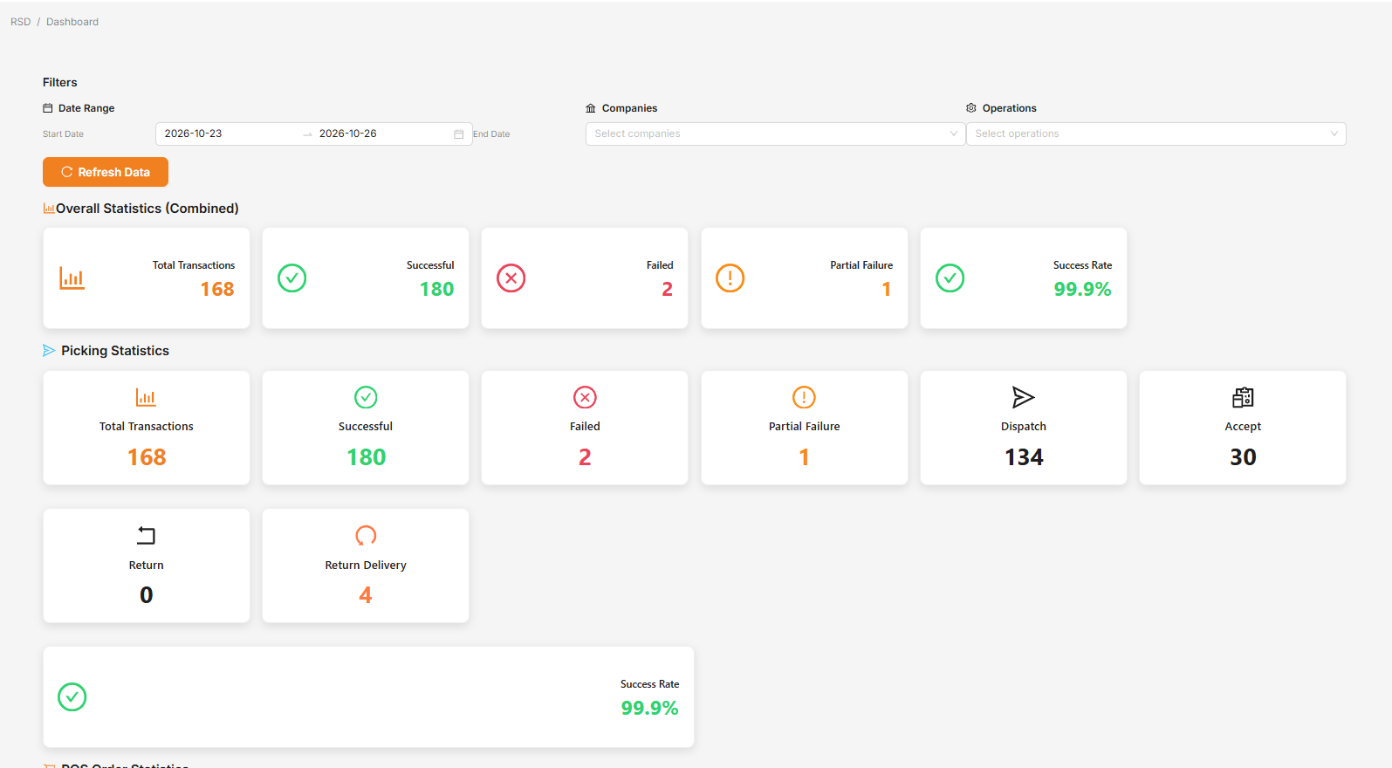
Operations dashboard — a dashboard showing all RSD operations and their success percentage, so you can monitor and take action on failures.
-
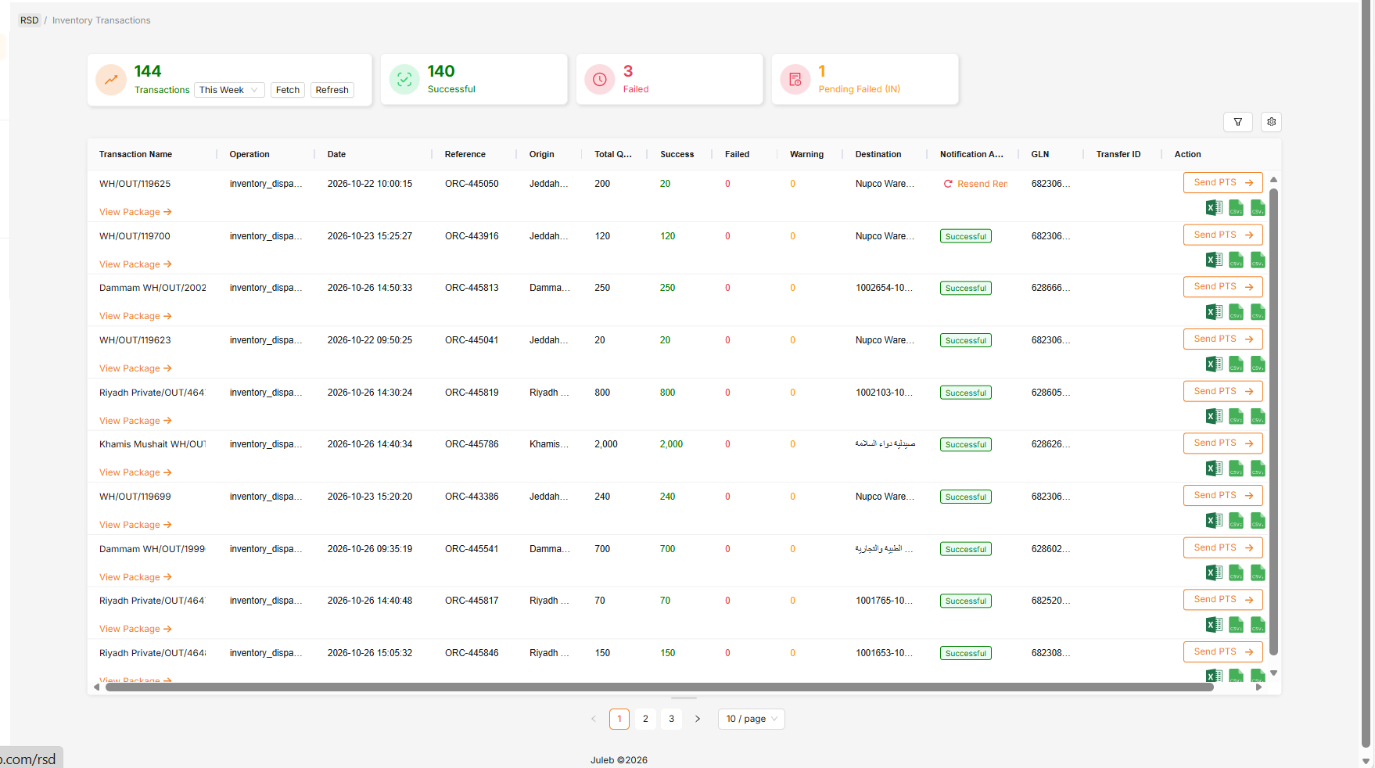
Reporting page — a dedicated page for quickly identifying and fixing failed operations.
Related API Documentation
- RSD Notifications — check the sync status of a picking or POS order.
- Inventory Picking — create deliveries, receipts, internal transfers, returns, and scraps.
- POS Order — create pharmacy sales, cancellations, and consumption records.
- Inventory How to Integrate and
POS How to Integrate — full integration guides,
including the
rsd_deserialization,global_import, andinternational_exportfields.